USB Lockit2.8
Publisher Description
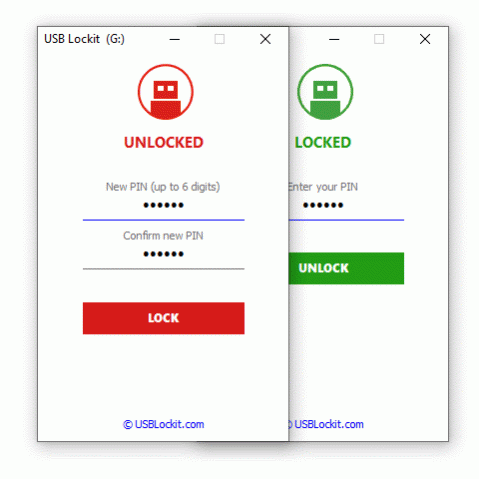
USB Lockit - Password Lock USB Drive.
Protects the USB drive with your photos, audios, videos and other files from prying eyes on Android Windows. Once the drive is locked, nobody can access your files.
All in 3 Easy Steps:
1. To lock the USB drive and protects all your files, simply set a PIN and click on LOCK button.
2. To unlock the USB drive and access to all your files, enter your PIN and click on UNLOCK button.
3. To relock the USB drive without entering the PIN every time, just a click on the LOCK button.
ATTENTION: If you lose or forget the PIN, it cannot be recovered. It is advisable to write it in a safe place.
When the USB drive is locked, your files remain safe in all Operating Systems.
Works with all USB flash drives on the market formatted in FAT32/exFAT.
Available for Android Windows PC.
Supported language: English, German, French, Spanish, Italian, Portuguese, Russian, Chinese.
Website: https://www.usblockit.com
About USB Lockit
This Encryption Tools program is available in English, Chinese, French, German, Italian, Portuguese, Russian, Spanish. It was last updated on 29 September, 2026. USB Lockit is compatible with the following operating systems: Windows.
The company that develops USB Lockit is Bezze Nicola. The latest version released by its developer is 2.8.
The download we have available for USB Lockit has a file size of N/A. Just click the green Download button above to start the downloading process. The program is listed on our website since 2021-12-09 and was downloaded 736 times. We have already checked if the download link is safe, however for your own protection we recommend that you scan the downloaded software with your antivirus. Your antivirus may detect the USB Lockit as malware if the download link is broken.
How to install USB Lockit on your Windows device:
- Click on the Download button on our website. This will start the download from the website of the developer.
- Once the USB Lockit is downloaded click on it to start the setup process (assuming you are on a desktop computer).
- When the installation is finished you should be able to see and run the program.
Program Details
General
System requirements
Download information
Pricing
Version History
version 2.8
posted on 2021-12-09
Added support for external SSD drive.
version 2.6
posted on 2020-11-19
Fixes some known issues.
version 2.5
posted on 2020-09-03
Requires privileges for USB drive I/O access..
version 2.1
posted on 2020-08-10
Fixed bug running on Windows 10.
version 2.0
posted on 2020-03-29
Added support for exFAT drive.
version 1.1
posted on 2020-01-29
Fixed issue with English language unrecognized by default.
version 1.0
posted on 2019-12-31
New Release
